










Professional ROG Laptop Keyboard and Touchpad Repair with nationwide Mail-In Service, fast turnaround, premium parts, and expert diagnostics.
When your ROG laptop keyboard or touchpad stops working, even simple tasks become frustrating. Our ROG Laptop Keyboard and Touchpad Repair service is designed to restore full control, responsiveness, and accuracy to your device.
We handle every type of fault—from liquid damage to non-responsive keys, sticky buttons, erratic cursor movement, and touchpad gesture issues. With our reliable Mail-In Service, customers across the country can easily send their laptop for professional repair.
Our technicians use genuine-quality parts and advanced diagnostic tools to ensure your ROG keyboard and touchpad work flawlessly. Whether you are a gamer, student, or professional user, we guarantee a smooth, precise, and long-lasting repair experience.
Our process is simple: ship your laptop to us, we repair it, test it fully, and ship it back safely. No hidden fees, no delays—just fast, expert Mail-In Service for all ROG models including ROG Strix, Zephyrus, Flow, and more.
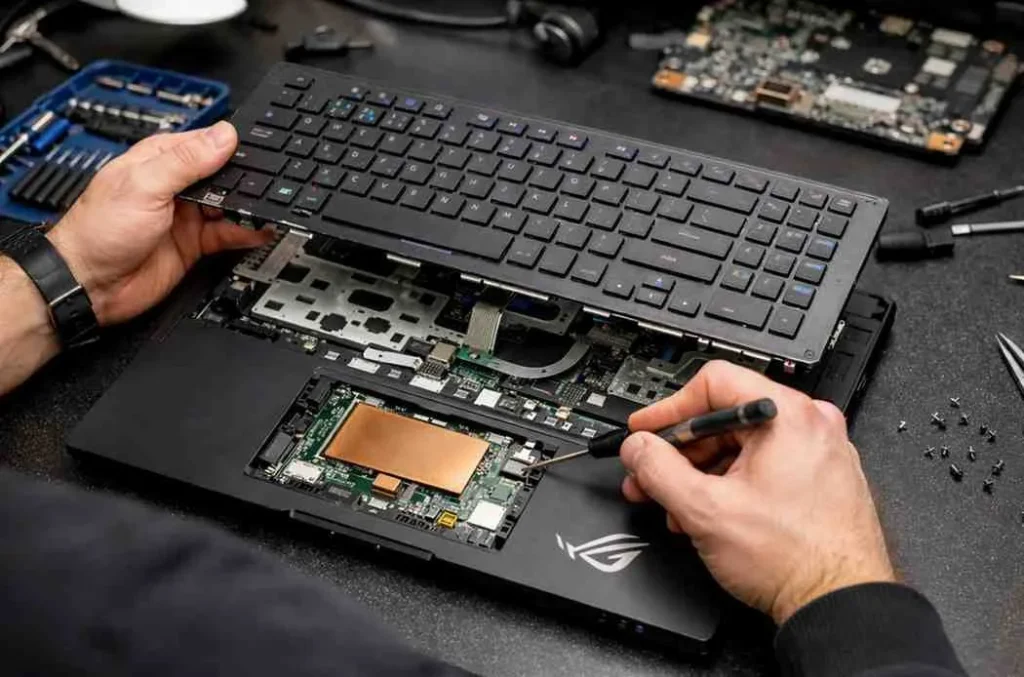
The keyboard on a Republic of Gamers laptop is a masterpiece of engineering, often featuring over-stroke technology and mechanical-membrane hybrids. Unlike standard laptops, these components are designed for high-stress environments. However, the same features that make them great—like per-key RGB lighting—make ROG Laptop Keyboard and Touchpad Repair a complex task.
When a single key fails, it is rarely just the plastic cap. Often, the failure lies in the membrane stack or the individual mechanical switch. Because many ROG models use a “riveted” keyboard design, a repair often requires a deep teardown of the chassis. This level of complexity is why professional intervention is frequently preferred over DIY attempts that could lead to further internal damage.
While gamers often use external mice, the touchpad remains vital for mobility and productivity. If your cursor is jumping erratically or the physical click has disappeared, an ROG laptop touchpad replacement might be the only solution.
ROG touchpads are typically precision-drivers that use glass surfaces for low friction; a single crack or a swollen battery beneath the surface can render them useless.
The replacement process involves disconnecting the battery and carefully unseating the touchpad module from the palm rest. In many ROG Zephyrus or Strix models, the touchpad is also a “NumberPad” (a digital Numpad).
Replacing these requires specific firmware calibration to ensure the BIOS recognizes the new hardware and maintains its dual-functionality.
The cursor doesn’t move or respond to gestures.
The pointer jumps or behaves unpredictably.
Multi-touch gestures stop working or respond incorrectly.
Outdated or corrupted drivers can disrupt touchpad functionality.
Cracks or wear on the touchpad surface can affect usability.
Is it worth repairing an ROG keyboard yourself? While there are many “how-to” videos online, ROG laptops are packed with fragile ribbon cables and proprietary screws. A simple ROG laptop keyboard repair attempt can end in a torn display cable or a short-circuited motherboard if the battery isn’t properly isolated.
Professional repair centers have the static-free environments and specialized pry tools needed for these sleek devices. Furthermore, a professional repair typically includes a warranty, ensuring that if your RGB lighting fails or a key stops working a month later, you are covered.
Issues like sticky or non-functional keys, random typing, unresponsive touchpad, erratic cursor, gesture failures, and physical damage all require professional repair. Our Mail-In Service provides accurate diagnostics and long-lasting solutions for every ROG model.
Most repairs are completed within 2–4 business days once we receive your device. Depending on parts availability and severity of damage, repair time may vary, but our Mail-In Service ensures fast, transparent communication throughout the process.
Yes. We use high-grade OEM or premium-quality replacement parts to ensure your ROG laptop keyboard and touchpad perform like new. Every component is tested thoroughly before returning your laptop via our Mail-In Service.
Absolutely. Even a small amount of liquid can cause stuck keys, short circuits, or touchpad failure. Our technicians specialize in liquid-damage cleaning and repair using safe, professional techniques through our nationwide Mail-In Service.
Yes. We provide secure packaging instructions, insured shipping options, and careful handling from start to finish. Your device stays protected throughout the entire Mail-In Service process.
Copyright © 2026, All Right Reserved. Design & Developed By SE Software Technologies