Have you ever opened your laptop only to hear a dreaded crack or feel a loose hinge?
A broken laptop hinge is one of the most common yet frustrating issues that can drastically affect your device’s usability. Whether you’re a business owner, an entrepreneur, or a busy professional, dealing with a malfunctioning laptop hinge can halt your productivity. You might wonder, “Is it worth fixing, or should I just replace the whole laptop?”
In this post, we’ll explore the costs, benefits, and options available when faced with a broken laptop hinge. By the end, you’ll have a clear understanding of whether a repair is the right choice for you or if it’s time to invest in a new device.
What Causes Laptop Hinge Failure?
Common Reasons for Broken Laptop Hinges
Laptop hinges are delicate, yet essential components that allow you to open and close your laptop. The hinge mechanism connects the screen to the body, and over time, it can wear out due to daily use. Some of the most common causes of broken laptop hinges include:
- Frequent Opening and Closing: Constantly opening and closing your laptop puts stress on the hinge, leading to eventual wear and tear.
- Physical Impact: Dropping the laptop or applying force to the screen can cause the hinges to crack or snap.
- Manufacturing Defects: In some cases, poor-quality hinges or faulty design can cause premature failure.
- Overheating: Excessive heat can weaken the material of the hinge, causing it to degrade over time.
Is Laptop Hinge Failure Common?
Yes, laptop hinge failure is one of the most frequently reported issues. According to a 2023 survey by TechJunkie, nearly 15% of laptop users experience hinge problems during the lifetime of their device. Laptops that are frequently moved or opened and closed in an aggressive manner are particularly vulnerable.
Can You Fix a Broken Laptop Hinge Yourself?
DIY Laptop Hinge Repair: Is It Feasible?
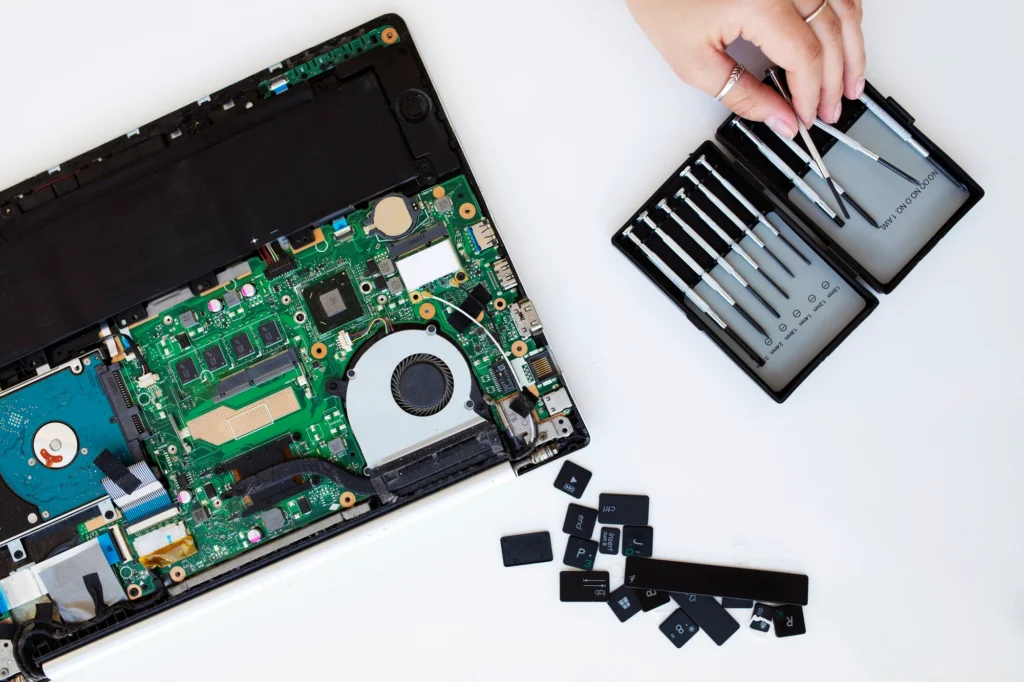
When dealing with a broken laptop hinge, many people consider trying to repair it themselves. After all, how hard could it be to replace a hinge? The reality, however, is more complex. Repairing a laptop hinge typically requires precision and the right tools.
Here’s what you need to consider before diving into a DIY repair:
- Skill Level: Most DIY repairs are not as easy as watching a few YouTube videos. You need to be comfortable with disassembling your laptop and handling small, delicate parts.
- Tools Required: You will need specific tools like screwdrivers, plastic prying tools, and possibly a replacement hinge that’s compatible with your laptop model.
- Risk of Further Damage: If you’re not careful, you could cause additional damage to other parts of the laptop, like the motherboard or screen.
Pro Tip: If you are not confident in your ability to perform the repair, it’s better to leave it to the professionals. Repairing a hinge involves precise work, and improper handling can result in a more expensive repair or even permanent damage.
What Are the Repair Costs for a Broken Laptop Hinge?
Laptop Hinge Repair Costs: What to Expect?
When it comes to repairing a broken laptop hinge, costs can vary widely depending on several factors, including your laptop’s brand, model, and the severity of the damage. Here’s a general breakdown:
- DIY Costs: If you decide to repair the hinge yourself, you’ll likely spend between $10 and $50 for the parts. However, this does not include the time and effort it will take to disassemble and reassemble the laptop.
- Professional Repair Costs: Most professional laptop repair shops charge between $80 and $150 for hinge replacement, including labor and parts. If your laptop is under warranty, the repair might be free or at a discounted rate.
- High-End Laptop Repair: For premium models like MacBooks or gaming laptops, hinge repairs can be significantly more expensive, ranging from $150 to $250 or more.
Pro Tip: Check if your laptop is still under warranty. Many manufacturers offer free repairs for hinge issues, especially if they are a known defect.
Should You Repair or Replace Your Laptop with a Broken Hinge?
When to Repair Your Laptop Hinge?
If your laptop is relatively new, still under warranty, or has other significant life left in it, repairing the hinge is usually the best option. Here are some scenarios where repair is worth considering:
- Affordable Repair Costs: If the cost of fixing the hinge is less than 30% of the value of your laptop, repairing it is usually more economical than replacing the device.
- Critical Usage: If your laptop is essential for your daily work, repairing the hinge allows you to continue using it without the cost of a new device.
- Unlikely Upgrade: If your laptop meets your needs and there aren’t any major performance issues, fixing the hinge is a practical solution.
When to Replace Your Laptop?
However, there are times when it’s better to replace your laptop entirely:
- Old Device: If your laptop is over 4-5 years old and experiencing frequent hardware or software failures, replacing the device may be more cost-effective in the long run.
- High Repair Costs: If the hinge repair is more than 50% of the cost of a new laptop, it’s often wiser to invest in a replacement.
- Out of Warranty: If the laptop is out of warranty and the repair cost is too high, it might be time to start fresh with a new laptop.
Case Study: John, a graphic designer, had a 6-year-old MacBook Pro with a broken hinge. The repair cost was quoted at $200, but the laptop had also been slow and showing signs of wear. After careful consideration, he decided to invest in a new laptop, which ultimately saved him more money as he also needed updated software compatibility.
How to Prevent Future Laptop Hinge Damage?
Proactive Tips to Extend Your Laptop’s Lifespan
While some hinge failures are inevitable, there are steps you can take to reduce the chances of your laptop hinge breaking prematurely. Consider these tips:
- Gentle Handling: Always open and close your laptop gently, avoiding excessive force.
- Regular Cleaning: Keep the hinge area clean from dust and debris to avoid obstruction or extra friction.
- Avoid Overheating: Ensure your laptop is properly ventilated to prevent heat buildup, which can weaken the hinges over time.
- Use a Case or Stand: When using your laptop for long periods, consider a laptop stand or carrying case to reduce stress on the hinge.
Pro Tip: Invest in a quality laptop stand or docking station to minimize the amount of opening and closing required for work.
Conclusion: Is Laptop Hinge Repair Worth It?
Ultimately, whether or not you should repair a broken laptop hinge depends on a variety of factors. If your laptop is still relatively new and the cost of repair is low, fixing the hinge is often the best option. However, for older laptops or when repair costs outweigh the benefits, it may be time to consider upgrading to a new device.
Before making a decision, weigh the repair costs against the value and lifespan of your laptop. Remember, if you’re unsure, it’s always a good idea to get a second opinion from a professional technician.
FAQ Section
1. How do I know if my laptop hinge is broken?
A broken laptop hinge is usually indicated by a loose or wobbly screen, difficulty opening or closing the laptop, or visible cracks around the hinge area.
2. Can I continue using my laptop with a broken hinge?
Yes, you can continue using your laptop, but a broken hinge may cause further damage over time. It’s best to repair it as soon as possible to prevent additional issues.
3. How long does it take to fix a laptop hinge?
Repairs typically take between 1 to 3 hours, depending on the complexity and the technician’s experience.
4. Are laptop hinge repairs covered under warranty?
In many cases, yes. If the issue is due to a manufacturing defect, most warranties will cover hinge repairs. Check with your laptop’s manufacturer for specific warranty details.
5. Is a broken laptop hinge a serious issue?
A broken laptop hinge can significantly affect the usability of your device, especially if it causes the screen to be unstable or difficult to open. It’s a problem that should be addressed sooner rather than later to avoid further damage.